
Select the full set
Drop multiple PDF, DOCX and TXT files into one session.
High-volume review
Stop scanning documents one at a time. Upload a set of PDF, DOCX or TXT files, then review an individual sentence-level AI detection report for every document.
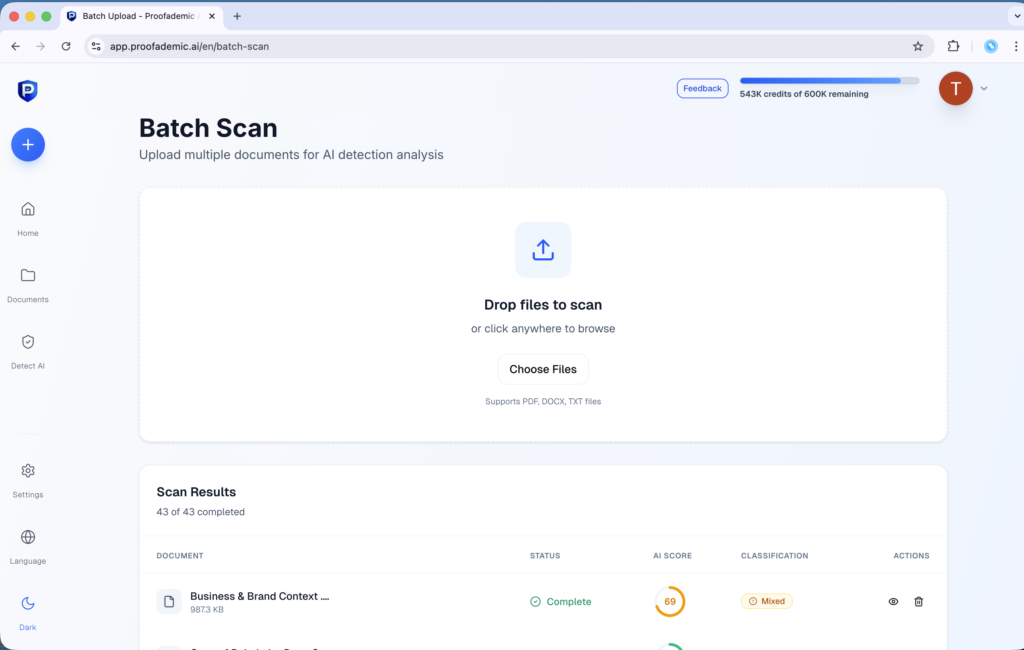
From upload to results
Upload the set together. Each document gets its own result, highlighted passages and shareable report.
Drop multiple PDF, DOCX and TXT files into one session.
The same AI detection engine analyzes every document individually.
Compare status and document-level results without opening every file.
Inspect flagged sentences, then export or share the report.
Your scan results
Check each file’s status, then open its report to read flagged sentences. An AI score alone does not prove misconduct.
See sentence-level detection →Full-detail processing
Upload supported file types together in the same batch.
Built for recurring review
Choose the workflow that matches the people, policy and volume behind the documents.
Review an assignment set while keeping every student report separate.
Support consistent review across larger submission workflows.
Triage contributor drafts before focused editorial review.
Common questions
File formats, reports, plan access and what the results mean.
Batch Scan currently supports PDF, DOCX and TXT files. You can include a mix of the supported formats in the same batch.
Yes. Each document receives its own overall estimate and sentence-level report rather than only a batch summary.
Processing time depends on the number and length of documents. Files are processed in parallel, and status remains visible in the results queue while the batch completes.
Yes. Batch Scan uses the main multilingual detector, which currently supports 23 languages. Exact coverage is listed on the multilingual detection page.
Batch Scan is listed on the Essential, Premium and Professional plans. Your plan’s word allowance and per-request limits still apply. Check the pricing page for current access.
Yes. A completed document report can be downloaded as a PDF or shared by link so another person can see the full results.
No. A flag does not prove who wrote a document. Read the flagged sentences and compare them with sources, drafts and earlier writing before drawing a conclusion.
Research and guidance
Is Pangram AI Detector accurate? See what our tests found, its limitations, false-positive concerns, pricing, & how it compares with Proofademic for…
Read the article →We stress-tested QuillBot AI detector on four samples. It flagged AI academic writing at 95% but scored AI creative writing at 0%.…
Read the article →We tested multiple tools and here are the 15 best AI tools for teachers in 2026 for lesson planning, grading, quizzes and…
Read the article →Ready for the full set
Choose a plan with Batch Scan, or talk to us about scanning document sets for your team.