Key takeaways
- Google Classroom has no built-in AI detector and relies entirely on third-party tools for AI detection.
- Google Classroom AI detectors should be used as a starting point, not a final verdict. Always use your judgment for fair grading.
- Generic AI detectors often fail with paraphrased or mixed content and can wrongly flag human-written work.
- The most reliable Google Workspace AI detection tools provide sentence-level analysis, explainability, and consistent results across submissions.
- Academic-first AI detectors like Proofademic are better suited for classroom use and fair integrity evaluation.
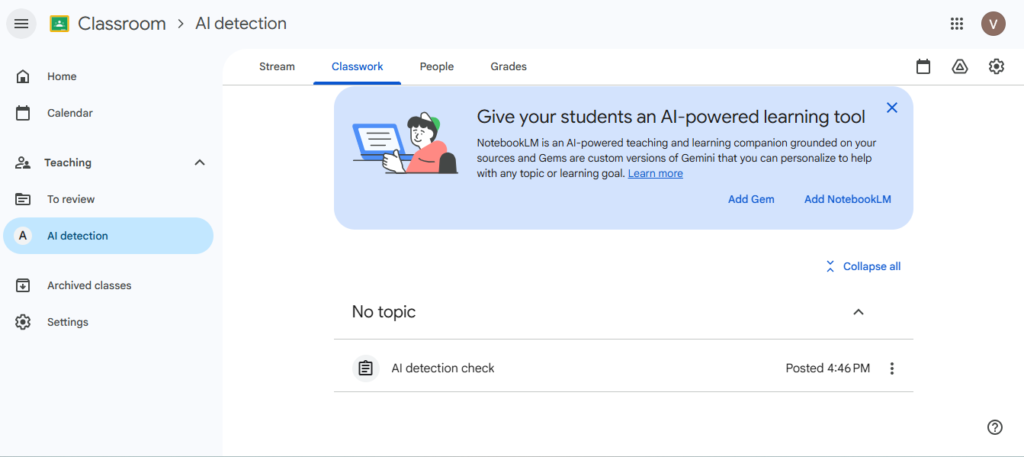
Google Classroom does not have any native AI detection capability. It has an originality check feature that compares submissions with already uploaded content and any previously submitted student papers for text similarity. Any AI detection for Google Classroom depends on third-party educator AI tool integrations or dedicated academic-focused tools like Proofademic.
In this guide, we will cover what Google Classroom can and can’t do natively, what different types of tool integrations actually look like in practice, how to evaluate detectors, and why academia-specific Google Classroom AI detectors like Proofademic are the right choice to maintain fair results and academic integrity.
Does Google Classroom have a built-in AI detector?
No. Google Classroom doesn’t have any built-in AI detector, and it relies on third-party tools to check student submissions for AI. Here is what it can do natively and what it cannot help you with:
What can Google Classroom do natively?
- Run originality reports that compare student submissions against web sources and Google Search results.
- On Education Plus plans, flag similarities against other student submissions within your school.
- Surface version history in Google Docs, including timestamps of large paste events. This is a useful signal, not a detector.
What Google Classroom cannot do natively
- Analyze AI authorship or run any classifier on writing style. You’ll need an external academic-specific AI detector like Proofademic for this task.
- Detect paraphrased AI content that has been edited to appear original.
- Identify which AI tool was used or how much of a submission was AI-assisted.
Google has included Gemini-assisted features inside Classroom for teachers, including lesson planning, rubric drafting, and feedback suggestions. However, there is no AI cheating detector Classroom tool built directly into the platform. Schools that want AI detection on Classroom assignments need a separate tool or workflow.
How to choose the right AI detector for Google Classroom?
Before you pick a Google Classroom AI Detector based on marketing claims, run it against these criteria:
- Explainability – Does it show sentence-level flags, which specific passages triggered the result, and why? A document-level percentage alone is not actionable in a fair review process.
- Uncertainty signaling – Does the tool communicate confidence responsibly, or does it present results as definitive? Any tool claiming 100% accuracy should be treated with skepticism.
- Mixed authorship handling – Most student work isn’t purely human or purely AI-generated – it is often a mix of both. Does the tool fairly detect paraphrased content, or does it reduce everything into a binary result?
- False-positive risk – How does it handle ESL writing, short answers, heavily scaffolded prompts, and formal academic phrasing? These are the highest-risk categories for wrongly flagging a student.
- Reporting and documentation – Can you export a report to share with a department head, student, or administrator? If you ever need to defend a finding, you need a paper trail.
- Pricing at scale – Per-seat and per-usage models look very different at 30 students versus 300. Model out what your actual cost will be before adopting.
Try Proofademic free for 3 days, no credit card required. Paste a student submission and see sentence-level AI detection in action.
Best AI detectors for Google Classroom teachers in 2026
AI writing tools are upgrading fast, and you must know what AI detectors colleges use in 2026 to maintain academic integrity and choose the right detection tools. Here are some of the best AI detectors that can be used directly with Google Classroom either through a Chrome extension, a direct integration, a Classroom-connected dashboard, or a different browser.
⭐️ Recommended: Proofademic
With in-depth sentence-level analysis, batch scanning, paraphrasing shield, and other features, Proofademic provides academic-first AI detection capabilities for institutions, educators, and students.
GPTZero
GPTZero offers a one-click installation for organizations that lets you add AI content detection with detailed results, and includes color-coded highlights across student submissions organized.
Copyleaks
Copyleaks is a third-party AI detector with both a Chrome extension and an LMS integration path for Google Classroom. It provides detailed AI percentages about AI and human content sections, along with AI source match.
Winston AI
With color-coded single AI text and a human-written percentage flag, Winston AI provides direct Classroom workflow integration with an admin-friendly setup process.
Pangram Labs
Although relatively new in the market, Pangram Labs provides a straightforward and accurate Google Classroom integration for AI detection. The results come in a color-coded format, with low to high confidence levels.
The false positive issue with generic Google Classroom AI detectors
A false positive is when a tool flags human-written work as AI-generated. With generic detectors calibrated on general web content rather than academic writing, false positives happen more often, and it tends to affect ESL students or submissions that are too formal.
Consider a first-year student from Japan, writing in English as her third language, who produces clean, grammatically structured sentences because she’s carefully applying the language rules she’s learned. Or consider a biochemistry student writing a methodology section with formal phrasing, templated, and structurally repetitive. The generic detector may flag their content written by AI. But the student’s actual experimental work and original analysis confirm that the text was human. This is a common example of false positives in academic settings due to the use of generic AI detectors.
False positives erode academic trust, create procedural risk for institutions, and can cause genuine harm to students who did nothing wrong. Any tool you adopt needs to demonstrate how it handles these cases, not just how well it catches obvious AI output. Educators should also understand how their universities approach AI detection and treat scores as a baseline, not as a verdict.
Proofademic: the best AI detector for Google Classroom
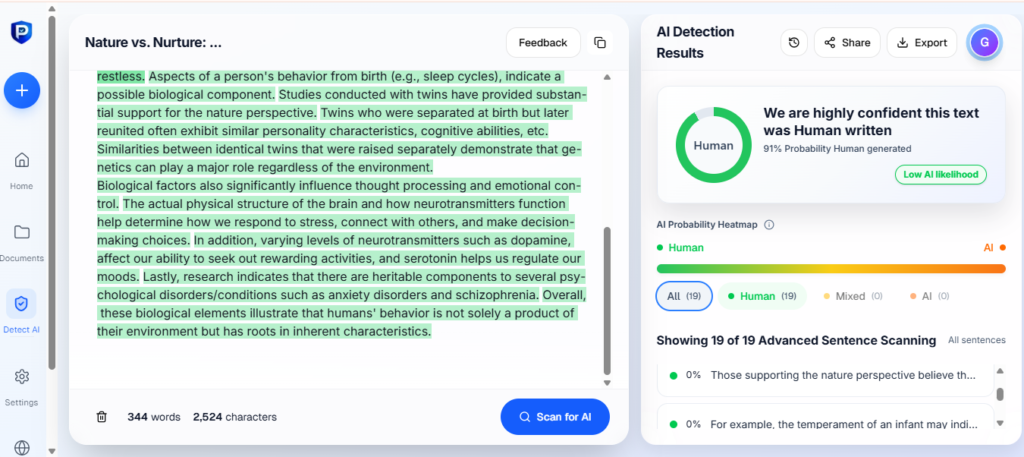
Most generic detectors are built to serve a broad market, including content publishers, SEO agencies, and HR teams. Proofademic Google Classroom AI detector is built specifically for academic settings, with the fairness and workflow requirements of educators built into the product from the ground up. Here is why this tool is the right AI detector for Google Classroom:
Sentence-level analysis
Rather than returning a single document-level percentage, Proofademic’s sentence-level detection flags individual sentences and passages, showing exactly where AI signals are concentrated in a submission. This transforms the result from a verdict into a starting point for a real conversation.
Paraphrasing shield
AI-generated content that’s been run through a paraphrasing tool is one of the hardest detection challenges. Proofademic’s paraphrase shield detection is calibrated to identify the underlying patterns of AI-generated text even after rewording and using generic paraphrasing tools.
Batch scan
Teachers don’t have to check one submission at a time. Proofademic’s batch scanning lets you process an entire class cohort at once, with results organized by submission. It saves the manual overhead that makes detection workflows unsustainable in practice.
Print-ready detection reports
Your report includes a detection summary with overall AI probability, highlighted document text, and a sentence-by-sentence analysis table in the form of a PDF that you can easily share with your department.
Pre-submission check for students
Proofademic is accessible to anyone, which allows students to check their own work before submitting, so they understand what signals their writing carries. This shifts the detection process from surveillance to transparency. By using this student AI content checker, they can address concerns before submission rather than being confronted after the fact.
3-day trial with free word credits
You can try Proofademic with real submissions before committing to a paid pricing plan. You get a free 3-day trial period with 1000-word credits, where users can understand how the sentence-level output works in a classroom context.
See how Proofademic flags AI content at the sentence level. Paste a submission or upload a file to run your first scan free.
TL;DR
AI detection in Google Classroom is not about finding a perfect tool; it’s about building a reliable, integrity-focused process. Since the platform itself doesn’t offer built-in AI detection, educators need to combine the right tools with informed judgment.
The most effective approach is to use Google Classroom AI detectors as a starting point, not a final verdict. Look for academic-first AI checkers like Proofademic that provide sentence-level insights, consistent results, and transparency of AI flags.
As AI tools continue to evolve, the goal now is not just detection, but maintaining fairness, clarity, and academic integrity in every decision you make.
Frequently Asked Questions
Does Google Classroom have a built-in AI detector?
No. Google Classroom’s originality reports compare submissions against web sources and other student work. They check for text similarity, not AI authorship. The platform has no AI detection capability built in. For that, you need a dedicated academic tool. Proofademic is built specifically for this: it runs sentence-level AI analysis on student submissions and is calibrated for academic writing, not general web content.
What is the best AI detector that works with Google Classroom?
Proofademic is the strongest choice: it works across individual, class, and institutional workflows with sentence-level analysis built specifically for academic submissions.
Can teachers see if students used ChatGPT on Google Classroom assignments?
Not directly. What teachers can do: check Google Docs version history for large paste events, run submissions through a sentence-level detector like Proofademic, and look for patterns across the document rather than treating a single score as a verdict. Detection is a starting point for a conversation, not a final finding.
Is GPTZero free to use for Google Classroom teachers?
GPTZero has a free tier with word count limits. Classroom-connected dashboard features require a paid plan. If you are evaluating free options, Proofademic offers a 3-day free trial with 1,000-word credits and no credit card required – enough to run real student submissions and see sentence-level results before committing.
How do I detect AI-written essays submitted through Google Classroom?
Run the submission through Proofademic for sentence-level AI detection. Review the results as a signal, not a verdict. Follow up with a short conversation and any process evidence before drawing conclusions or escalating.
Does Proofademic integrate with Google Classroom?
Proofademic works alongside Google Classroom through a direct upload workflow: download the submission from Classroom, upload it to Proofademic, and get a sentence-level AI detection report within minutes. For classes with multiple submissions, batch scanning lets you process an entire cohort at once. Results export as a PDF you can share with department heads or administrators.