Key Takeaways
- Perplexity and ChatGPT serve different purposes: use Perplexity for research and cited sources; use ChatGPT for writing and brainstorming.
- Perplexity provides quick, referenced answers while ChatGPT helps generate and organize content.
- For assignments, Perplexity excels in literature reviews and sourcing, while ChatGPT wins in essay drafting and coding help.
- Use both tools effectively to enhance your study routine without compromising academic integrity.
- Always check your institution’s guidelines before using AI tools like Perplexity and ChatGPT for schoolwork.
Two days before your research paper is due, at 11 PM, you find yourself looking at a blank document. You are aware that a strong argument, references, and citations are necessary.
Your creative juices aren’t flowing, despite your best efforts to come up with a way to begin.
As a last resort, you use Perplexity and ChatGPT, your friendly neighborhood AI tools, but you run into trouble deciding which is best for the job.
The thing is, these tools work differently. Even if you did everything correctly, using the incorrect one will result in you wasting time on unreliable sources or being flagged for using AI.
In this article, we’ll guide you through the process of selecting the best tool so you can work more efficiently without sacrificing your academic integrity.
Quick verdict for students
Despite their similar appearances, Perplexity AI and ChatGPT are excellent for different purposes. To get you started, here is a summary of their most effective applications:
| Use Perplexity if you need | Use ChatGPT if you need |
| Quick, cited answers with reliable sources for research papers | Help brainstorming essay topics or thesis statements |
| Recent information on current events | A draft outline for your paper or presentation, and creative writing or storytelling support |
| Academic sources and peer-reviewed papers | Complex concepts explained simply |
| Multiple viewpoints on a controversial topic | Coding or debugging help |
| Fast fact-checking with transparent sourcing | Practice questions for exams |
Simply put, Perplexity serves as a research librarian that consistently references its sources, whereas ChatGPT serves as a writing tutor that assists you in problem-solving and idea drafting.
One for the start of your paper and another for the middle of your work.
Perplexity vs ChatGPT: what each tool is
Before we get too technical, let’s first talk about what these tools actually do in practical terms.
Perplexity: a citation-first research assistant
Perplexity prioritizes freshness and accuracy.
It can be compared to a more intelligent version of Google that provides direct answers to your queries rather than merely links. When you ask a question, Perplexity searches the internet and gathers data from credible sources, academic databases, and recent publications.
ChatGPT: a flexible writing and reasoning partner
ChatGPT is designed for conversation and content creation.
Its primary strength is in comprehending context and elucidating concepts, though it can also search the web if you enable that feature. It generates drafts, breaks down concepts, makes practice questions, and simplifies complex subjects.
ChatGPT does not automatically cite sources as Perplexity does.
Perplexity AI vs ChatGPT differences that actually matter in school
Disparities between Perplexity AI and ChatGPT that are significant in the classroom. You need tools that truly work when you’re trying to stay on top of your coursework, juggling assignments, and studying for tests.
Traceability: citations by default vs. not-by-default
If you’re for convenient citations, Perplexity is the tool for you.
When it tells you about a study or historical event, you can click the citation and go straight to the source. This matters because professors require you to back up claims with credible sources. This tool simplifies that for its users.
ChatGPT, on the other hand, doesn’t cite by default. You can turn on web browsing for sources, but they’re still less visible and less consistent. If you use GPT’s output in a paper, verify the facts first and find sources to cite.
Conversation depth: long threads vs. shorter continuity
ChatGPT remembers context across long conversations.
You can ask follow-ups and build on earlier responses without repeating yourself. This is useful for creating essay outlines and methodically solving problem sets.
Perplexity handles questions more autonomously.
It manages follow-ups and asks pertinent questions, but it lacks the ability to preserve conversational context. Every search seems more like a fresh query than a contribution to a continuing conversation.
When they get things wrong
Both tools make mistakes in different ways.
ChatGPT occasionally “hallucinates” and asserts incorrect information with assurance, particularly when discussing current affairs or specialized subjects outside its training data.
Additionally, it may oversimplify difficult ideas to make them easier to understand, which can be problematic if technical accuracy is required.
Although it’s not flawless, Perplexity’s real-time web search lessens hallucinations.
If its sources contain errors or bias, it incorporates those problems into its answer.
The difference is that it shows you the sources, so you can evaluate them yourself.
- Check Perplexity’s sources carefully
- Verify ChatGPT’s claims yourself
- Confirm sources support the statements made
- Ensure quotes match the original wording
- Use AI tools to speed up research and writing, not to replace critical thinking

Student task breakdown: which tool wins by assignment type
Different assignments require different approaches. Let’s see how Perplexity and ChatGPT compare for typical student tasks.
Literature review & finding sources
🏆 Winner: Perplexity
Perplexity’s Academic Filter searches specifically for peer-reviewed papers and scholarly articles. The built-in citations make it easy to build your bibliography and save you from sorting through dozens of Google Scholar results.
ChatGPT helps you understand sources, but it’s not built for source discovery.
Essay planning & drafting
🏆 Winner: ChatGPT
Need help turning research into a coherent argument?
ChatGPT helps you develop outlines, craft thesis statements, generate counterarguments, and revise drafts.
Paste your rough outline and ask it to identify weak points or suggest ways to strengthen your evidence. It helps you find the right words for those hard-to-understand ideas and maintain a consistent voice.
Perplexity provides facts for your arguments, but it’s not designed for creative writing.
Studying and tutoring
🏆 Winner: ChatGPT
When you need step-by-step explanations, practice questions, or help understanding difficult concepts, ChatGPT’s conversational format works best.
Ask it to explain something in simpler terms, generate practice problems, or quiz you on material. If you’re struggling with calculus, ask the tool to explain derivatives using everyday examples, then have it create practice problems that increase in difficulty.
Perplexity answers specific factual questions about study material, but it’s not optimized for interactive tutoring.
Presentations & projects
🏆 Winner: ChatGPT
Creating presentations, organizing group projects, or summarizing complex information works is better handled by ChatGPT. It can provide you with slide outlines, suggest data visualization approaches, and write speaker notes.
Perplexity finds current statistics and facts for your slides, but ChatGPT’s ability to structure and organize information makes it better for presentation design.
Coding / STEM problem sets
🏆 Winner: ChatGPT
For programming assignments, debugging, or mathematical problem sets, ChatGPT’s coding capabilities are more advanced. With this tool, you can simply paste error messages for troubleshooting advice or ask it to walk you through algorithms.
Perplexity looks up syntax or finds documentation, but it’s not designed for interactive problem-solving.
Perplexity Pro vs ChatGPT Plus
Both tools offer premium plans at $20 per month, but they unlock different features. Here’s what you get with each and whether it’s worth the cost for students.
| Perplexity Pro ($20/month) | ChatGPT Plus ($20/month) |
| Unlimited Pro searches (vs. 3 per day on the free plan) | Access to GPT-4o, advanced reasoning models, and custom GPTs for specialized tasks |
| Access to multiple AI models (GPT-4, Claude, Gemini, and more) | Faster response times plus voice mode |
| More file uploads for analyzing PDFs and documents | Web browsing and real-time information |
| Image generation capabilities | DALL-E 3 for image generation |
| Priority support | Priority access during peak hours |
Budget decision for most students
The best approach is to start with free versions of both.
Use Perplexity for research, ChatGPT for writing and studying. If you consistently hit the limit on a single tool, upgrade that one. Many students complete entire semesters on free plans by using each tool for what it does best.
When to upgrade
Consider paying during intensive periods, such as thesis research, comprehensive exams, or multiple writing-intensive courses. The $20/month investment saves hours and helps you produce better work.
Does Perplexity use ChatGPT?
This is a common question that deserves a straightforward answer.
Perplexity does not exclusively use ChatGPT or OpenAI’s models.
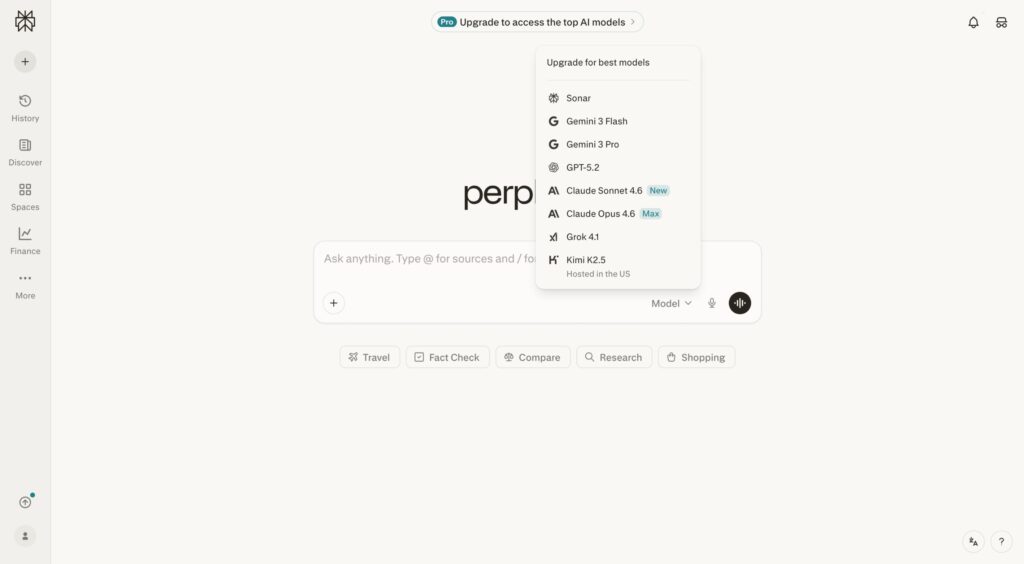
Instead, it uses multiple AI models from different providers, including OpenAI’s GPT models (such as GPT-4), Anthropic’s Claude, Google’s Gemini, and its in-house models like Sonar.
As a Pro user, you can manually select a model or let it automatically choose the best one for your query. If Perplexity switches from using GPT-4 to Claude for a particular query, you might notice subtle differences in reasoning style or how information is presented.
Some models are better at certain types of tasks. But what doesn’t change is the core workflow: searching the web, pulling sources, and citing them clearly.
Why Perplexity is famous among students
Perplexity gained traction quickly among students and researchers for a few key reasons:
- Speed for research: this tool is great for students juggling multiple deadlines. Instead of opening ten browser tabs and manually compiling information, you get an answer with sources in seconds.
- Citations build trust: in academic settings, unsourced claims are worthless. The tool’s automatic citations address this directly.
- Academic-friendly features: filtering searches for academic papers, setting focus modes for different source types, and organizing research in Spaces make it feel purpose-built for scholarly work.
- Quick verification: When you need to fact-check a lecture claim, verify a historical date, or confirm a scientific finding, it delivers fast answers with sources you can trust.
Academic integrity: how to use ChatGPT and Perplexity without risking your grade
Before using AI on your schoolwork, check your syllabus and ask your instructor to make sure that you are allowed to use these tools.
Behaviors that trigger red flags:
- Pasting AI paragraphs directly into assignments without substantial revision
- Including facts or statistics you can’t trace to credible sources
- Failing to cite sources properly
- Submitting work where the writing style suddenly shifts
- Submitting AI content as your own original work
A safe workflow:
- Use Perplexity to find sources and gather information
- Take notes in your own words, don’t copy AI responses
- Use ChatGPT for brainstorming ideas, outlines, and counterarguments
- Cite original sources
- Run your work through Proofademic’s ChatGPT detector
- Keep drafts and notes to demonstrate your work process
- Disclose tool use if your instructor requires it
When you use information from sources found through Perplexity, cite the original source.
If you need to cite ChatGPT itself, learn how to cite ChatGPT in APA, MLA, and Chicago formats.
If your instructor requires disclosure, be honest and explain which tool you used and why.
The final steps before submission
Even when you use AI responsibly, your work can still trigger AI detection softwares. Understanding how to detect AI-written essays in academic settings and why this happens can protect you.
These tools aren’t perfect. They flag work as AI-generated even when it’s not, especially if you’re a strong writer or the content is edited heavily.
Why responsible students get flagged
- You adopted AI’s phrasing without realizing it
- Your writing is very polished or formal
- You used common transitions that AI also uses
- Your topic is one AI frequently writes about
What makes Proofademic different
Proofademic is built specifically for academic work. It helps you understand how your writing might appear to university AI detection tools before you submit.
Proofademic provides sentence-by-sentence analysis, showing which parts might raise flags and why. This helps you make targeted revisions rather than rewriting everything. It also helps you understand the difference between ethical AI assistance and over-reliance.
This lets you identify passages that might trigger false positives, revise flagged sections to reflect your voice, verify proper attribution, and confirm alignment with integrity standards.
FAQs
Is Perplexity AI better than ChatGPT?
It depends on what you’re trying to do. Perplexity is better for research tasks that require recent information and cited sources. ChatGPT is better for writing, brainstorming, explaining concepts, and creative work.
Why is Perplexity so famous?
Perplexity gained popularity because it combines the speed of AI with the transparency of traditional research. Unlike other AI tools that don’t cite sources, Perplexity shows you exactly where its information comes from. This combination of convenience and credibility made it especially popular among students and researchers.
Why is Perplexity controversial?
Perplexity has faced criticism for essentially repackaging content from original sources, which some argue reduces traffic to those sources even when citations are provided. For students, the key controversy is the risk of relying on summaries instead of engaging directly with primary sources.
How is Perplexity different from ChatGPT or Claude?
Perplexity is built primarily as a search and research tool that automatically cites sources and prioritizes real-time web information. ChatGPT and Claude are designed as conversational AI assistants focused on dialogue, content creation, and reasoning.
Is Perplexity AI good?
Yes, Perplexity is particularly good for research, fact-checking, and finding credible sources quickly. Its strength lies in delivering cited answers with transparent sourcing, which makes it valuable for academic work.
Can Perplexity help with homework?
Perplexity can help with the research phase of homework by finding information and sources quickly. You can use Perplexity to accelerate research and understanding, then write your own original responses based on what you’ve learned.
Does ChatGPT cite sources like Perplexity?
Not by default. ChatGPT generates responses based on its training data without automatic citations. You can enable web browsing mode to get sources, but even then, citations are less comprehensive than what Perplexity provides.
Can professors detect if I used Perplexity or ChatGPT?
Professors can’t detect which specific tool you used, but they can detect patterns that suggest AI assistance. Both tools can leave telltale signs like overly polished prose, generic phrasing, or writing that doesn’t match your usual style.
Is it cheating to use Perplexity for research?
Using Perplexity to find sources and understand topics is generally not considered cheating, as it’s functionally similar to using a search engine or library database. However, policies vary by instructor and institution. Always check your syllabus and ask if you’re unsure.
Which AI tool is best for writing essays?
ChatGPT is generally better for writing tasks because of its conversational nature and ability to help you develop ideas iteratively. However, you should use it for outlining, brainstorming, and revising, not for generating entire essays to submit. Perplexity is better for the research phase. The best approach combines Perplexity for gathering sources and ChatGPT for organizing your thoughts, with you doing the actual writing.